
Software Licensing Architecture: Designing a Yearly Single-User Model
Introduction
Software licensing is the foundational system that governs who is permitted to run your application, on how many machines, and for what duration. When a customer purchases a commercial software application, they are not purchasing the source code—they are acquiring a cryptographic entitlement granting permission to use the software under explicit terms.
For independent software vendors (ISVs) and engineering toolmakers, the yearly, single-user license model is one of the most effective and sustainable models. It provides predictable recurring revenue while protecting valuable software investments.
In this model, the constraints are clear:
- Single Owner: One license belongs strictly to one verified customer.
- Device Exclusivity: The license may be actively bound to only one physical machine at a time.
- Fixed Term: Entitlements remain valid for exactly 365 days from purchase.
- Annual Renewal: Customers must renew annually to maintain access or updates.
This article breaks down the end-to-end architecture required to build an entitlement and activation engine that enforces these rules securely without frustrating legitimate paying users.
1. The Core Verification Triple
Every software licensing engine—regardless of programming language, operating system, or cloud backend—answers three fundamental questions every time the application initializes:
                     Application Launch Check
                                │
        ┌───────────────────────┼───────────────────────┐
        ▼                       ▼                       ▼
 1. Authenticity          2. Validity             3. Identity
Is this genuine and     Is the license still    Is this the exact
 cryptographically      within its purchased    authorized machine
    untampered?             time window?           for this key?
If the response to all three inquiries is affirmative, the application unlocks its computational core and user interface. If any check fails, the application gracefully restricts execution, drops into an evaluation or read-only mode, and directs the customer to the appropriate remediation step (online reactivation, renewal, or technical support).
2. Core Architectural Components
A resilient licensing architecture requires five distinct, cooperating entities:
┌─────────────────┐        Activation Request        ┌──────────────────────┐
│                 │─────────────────────────────────>│                      │
│ Customer Device │                                  │  Authoritative Cloud │
│ (Desktop App)   │<─────────────────────────────────│    License Server    │
└─────────────────┘    Signed Cryptographic Token    └──────────────────────┘
         │
         ▼
 ┌───────────────┐
 │ Local License │ (Offline Verification)
 │  Cache File   │
 └───────────────┘
2.1 Unique License Key
A high-entropy string generated at the time of purchase and delivered out-of-band (typically via automated purchase confirmation email). This key serves as the customer's secret credential to claim their entitlement:
# Standard hyphenated alphanumeric format
LIC-PRO-8F29-E4B1-99C3-007A
2.2 Authoritative License Server
A centralized backend service that serves as the single source of truth for all license records. It stores:
- License key identifiers and customer account linkage
- Issue timestamps and expiration deadlines
- Maximum allowed concurrent machine bindings (
max_seats = 1) - The active machine fingerprint currently bound to the key
- Audit logs of all activation, renewal, and release attempts
2.3 Local Cryptographically Signed License File
Once activated online, the application stores a cryptographically signed payload locally on the customer's machine (e.g., inside ~/.config/app/license.dat or %APPDATA%\App\license.lic).
Because this file contains an asymmetric cryptographic signature (signed with the license server's private key and verified using a public key bundled into the app binary), the client application can verify its entitlement offline without contacting the server on every launch.
2.4 Hardware Fingerprint (Device Identifier)
A deterministic hash generated from immutable hardware characteristics of the customer's computer (such as CPU IDs, motherboard UUIDs, or primary MAC addresses). This fingerprint allows the licensing engine to tie an activation to a single physical device and deny concurrent execution on other machines.
2.5 Expiration & Renewal Horizons
The explicit timestamp marking the end of the one-year entitlement term. The application compares local system time and trusted network timestamps against this deadline to determine validity and trigger renewal alerts.
3. Cryptographic Verification & Token Anatomy
To avoid transmitting unencrypted license state that could be easily spoofed or altered using memory debuggers, licensing payloads are signed with asymmetric cryptography (such as Ed25519 or RSA-4096):
{
  "header": {
    "alg": "Ed25519",
    "typ": "LIC-TOKEN"
  },
  "payload": {
    "license_id": "lic_908f431b99a",
    "customer_email": "user@example.com",
    "machine_fingerprint": "a3f89012c448bb91230044efc",
    "issued_at": 1756771200,
    "expires_at": 1788307200,
    "features": ["solver_pro", "export_dxf", "batch_mesh"],
    "grace_period_days": 14
  },
  "signature": "7f8b9912cd34...[ed25519_signature]..."
}
Security Rule: The private key used to sign license files must never leave the secure boundary of your production license server. The desktop application contains only the corresponding public key used exclusively for signature validation.
4. How Activation Works
Activation is the formal handshake that binds a fresh license key to the user's specific hardware fingerprint.
- Purchase & Delivery: The customer purchases the software and receives their license key via secure email.
- Key Entry: Upon launching the software, the customer is prompted to enter their license key.
- Fingerprint Harvesting: The desktop application computes the local hardware fingerprint hash.
- Server Handshake: The app sends an HTTPS POST request with the license key and machine fingerprint to the central licensing API.
- Validation Check: The server ensures the key exists, has not passed its expiration date, and is not already registered to a different active machine.
- Device Registration: The server binds the machine fingerprint to the license record in the database.
- Signed Payload Receipt: The server generates a signed license payload containing the device identifier and expiry timestamp, and returns it to the client.
- Local Storage: The application saves this signed file in protected application data storage and unlocks full functionality.
Activation Flow Diagram
The diagram below illustrates the sequence of operations between the user, desktop app, and license server:
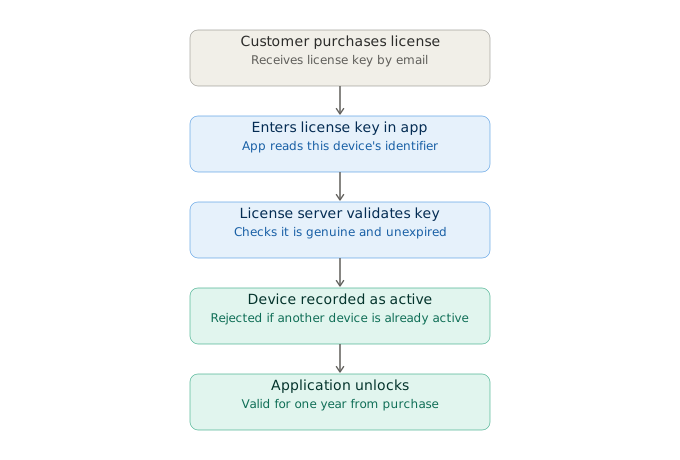
If a user enters that same key on a second machine while the first machine remains registered, the license server rejects the request with HTTP 409 Conflict: Seat already occupied.
5. Expiry, Grace Periods, and Renewal Lifecycles
Because licenses carry a firm annual expiration date, the client monitors validity continuously:
[ Active License Window (11 Months) ]──>[ Renewal Notice (30 Days) ]──>[ Expiry ]──>[ Grace Period (14 Days) ]──>[ Locked ]
5.1 Proactive Renewal Prompts
Starting 30 days prior to expiration, non-intrusive banner notifications inform the user of the impending renewal date with direct checkout links.
5.2 Server-Side Expiration Extension
When the customer completes their annual renewal transaction:
- The payment webhook triggers the license server to extend
expires_atby exactly +365 days. - When the desktop app performs its next background check-in, it downloads the renewed signed token seamlessly without interrupting workflow.
5.3 Offline Grace Periods
Network connectivity cannot be guaranteed 100% of the time, especially for users traveling or working in secure isolated test facilities.
A well-designed system includes an offline grace period (e.g., 7 to 14 days). If the application cannot reach the licensing server to re-verify or refresh tokens when an annual boundary is near, it continues functioning normally until the grace counter expires.
6. Secure Machine Migration (Damaged or Replaced Hardware)
In desktop computing, devices are inevitably lost, damaged, upgraded, or reformatted. When a customer's primary laptop fails, they cannot click a "Deactivate This Computer" button on a machine that no longer boots.
Allowing arbitrary client-side deactivations creates a massive piracy loophole where a license is ping-ponged endlessly across hundreds of workstations. Conversely, requiring manual customer support intervention for every machine change wastes engineering hours.
The Recommended Architecture: Verified Out-of-Band Migration
Lost / Broken Device                  Self-Service Portal / Auth Email                 New Workstation
        │                                            │                                        │
        ├── [Old PC Destroyed]                       │                                        │
        │                                            ├── [Submits Key + Purchase Email]       │
        │                                            ├── [Receives One-Time Magic Link]       │
        │                                            ├── [Confirms Machine Disconnect]        │
        │                                            │                                        │
        │   Server Releases Seat                     ▼                                        ▼
        │<────────────────────────── [Old Fingerprint Unlinked] ───────────> [Activates License Fresh]
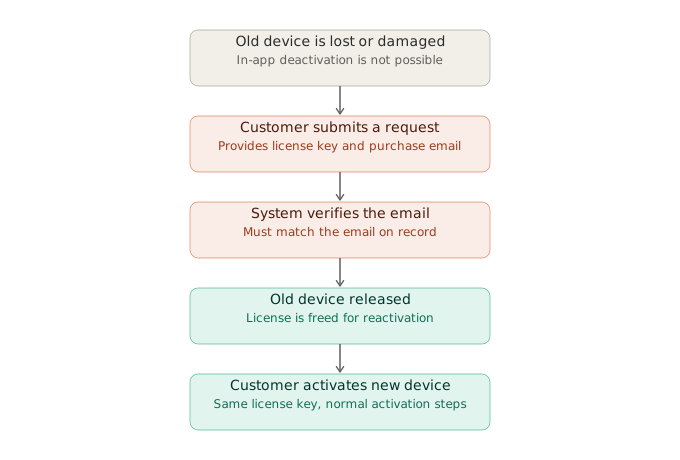
- Self-Service Customer Portal: The customer navigates to your official license portal (
account.company.com/licenses). - Identity Verification: The customer enters the license key along with the original email address used at purchase.
- Magic Link Confirmation: The server sends a single-use verification link to that verified email address. Clicking the link proves account ownership.
- Machine Release: Once confirmed, the server marks the old hardware fingerprint as revoked.
- Clean Activation: The customer enters their license key into the application on their new workstation. The server accepts the new machine fingerprint and issues a new signed license token.
Device Change Flow Diagram
The diagram below shows how an unreachable device is safely unlinked using out-of-band email verification:
7. Security Hardening & Tamper Resistance
An effective licensing engine balances user convenience against bad-faith circumvention:
| Attack Vector | Vulnerability | Mitigation Strategy |
|---|---|---|
| System Clock Rollback | User resets system clock back by months to bypass annual expiration. | Store the last seen UNIX timestamp in an encrypted cache file. If current_system_time < last_seen_time, block execution until synchronized via Network Time Protocol (NTP). |
| License File Tampering | User modifies plain text expiry dates inside the license cache file. | Sign all license files with Ed25519/RSA digital signatures. Tampered bytes immediately invalidate the cryptographic signature check. |
| Token Replay to Second Machine | User copies the .lic file to a coworker's computer. |
The license file contains the authorized hardware fingerprint. The coworker's machine will detect a fingerprint mismatch on startup and reject the file. |
| Binary Patching (No-op) | Attacker replaces license check functions with return true. |
Distribute verification logic across compiled modules (.so / .dll), employ symbol stripping, and embed integrity verification in core solver routines. |
8. Requirements Specification & Architecture Checklist
Functional Requirements
- Unique Credential Generation: Automatically generate and distribute secure alphanumeric license keys upon successful checkout.
- Single-Seat Hardware Binding: Limit active software execution to one registered machine fingerprint at any given time.
- Continuous Validation: Validate cryptographic signatures on application startup and perform periodic background health check-ins.
- Annual Renewal Pipeline: Extend entitlement horizons by 365 days upon completed subscription renewal webhooks.
- Out-of-Band Seat Migration: Allow customers to liberate locked licenses from destroyed machines using email ownership verification.
- Proactive Expiry Notifications: Surface polite countdown notifications starting 30 days prior to term expiration.
Non-Functional Requirements
- Zero-Latency Offline Boot: Verify existing signed licenses locally in
< 10mswithout blocking the main UI thread or requiring active internet. - Cryptographic Resilience: Use industry-standard asymmetric cryptography (Ed25519 or RSA-4096) with zero custom cryptographic primitives.
- Frictionless Non-Technical UX: Provide a clean 2-step activation modal that non-technical business users can complete without terminal interaction.
- Comprehensive Audit Trail: Maintain immutable backend logs of all registration, validation, transfer, and revocation actions for support forensics.
9. Conclusion
A yearly, single-user software licensing architecture succeeds when it treats licensing not merely as copy protection, but as an integral element of product reliability and user experience.
By separating the authoritative cloud registry from offline-capable client verification, binding seats to cryptographic hardware fingerprints, and providing an out-of-band recovery channel for damaged machines, engineering teams can safeguard their software value while delivering a seamless, dependable experience to legitimate customers.
Index Outline
23 SectionsOn This Page
Related Chronicles (System Design)
Desktop Application Security, Packaging & Architecture: A Production Guide
Learn how to design secure, production-ready desktop applications using Electron, Python, Docker, and native compiled modules. This guide covers architecture, packaging, security hardening, licensing, and deployment best practices.
Implementing Real-Time Voice Search in Modern Web and Mobile Apps
A comprehensive guide to implementing real-time Voice Search across React, Next.js, and React Native (Expo) using the native Web Speech API, custom hooks, and mobile speech modules.
Publishing a React Native Application to the Google Play Store
A practical guide to preparing, signing, testing, and publishing a React Native application on the Google Play Store.